
PUBG permanent ban updates and the banned players list expose tough weekly anti-cheat actions against aimbots, ESP hacks, and teamkilling abuse.
As a dedicated player and longtime observer of PUBG: BATTLEGROUNDS, I want to break down the latest weekly enforcement report from the PUBG Anti-Cheat Team. The newest banned players list is now public, and it once again shows a strong commitment to punishing illegal software abuse and serious in-game misconduct. Permanent bans remain the primary tool for removing malicious accounts, and this week’s action wave highlights how important community reporting and internal detection systems have become in protecting the core battle royale experience.
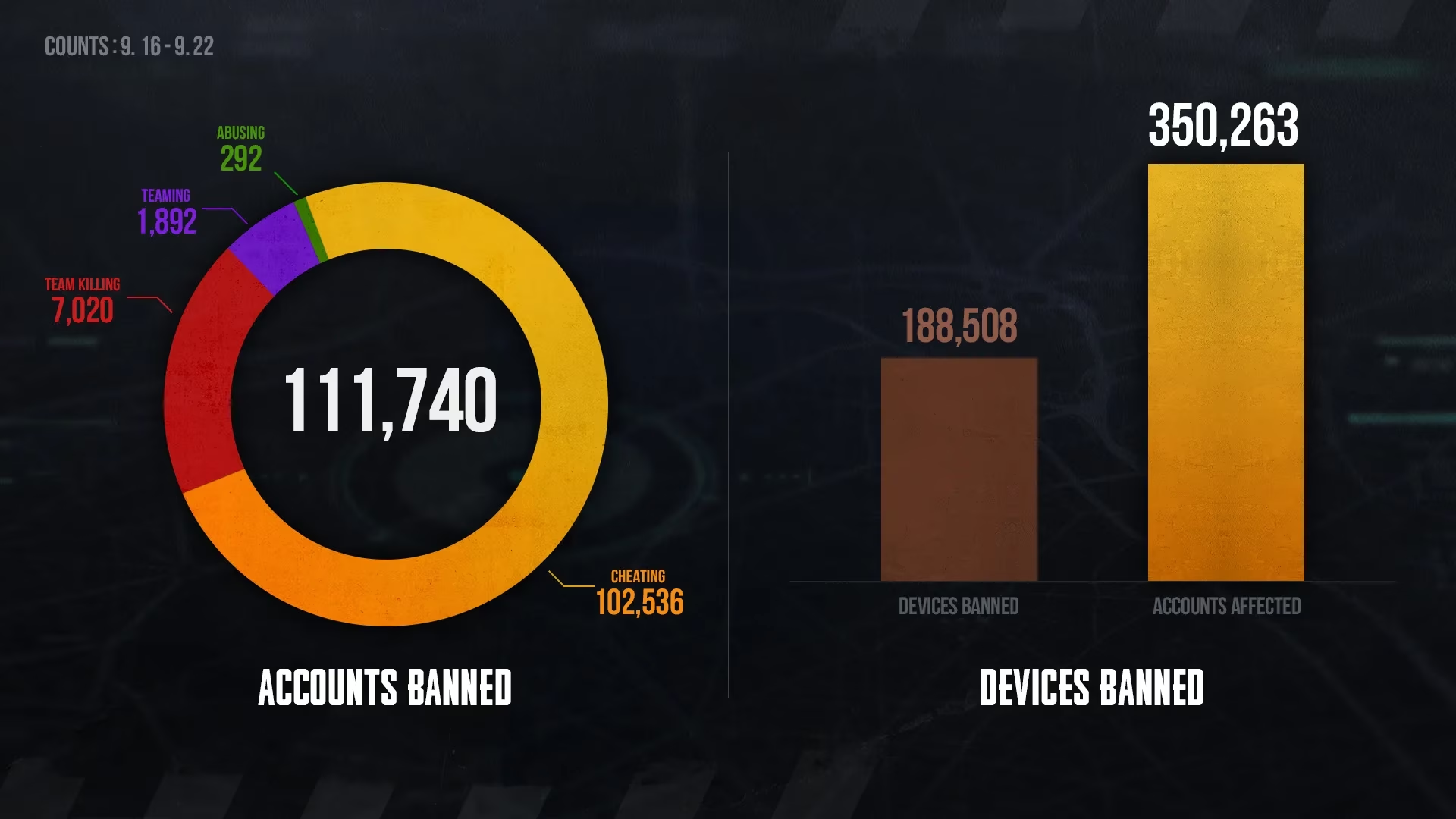
The enforcement bulletin confirms that a large set of accounts received permanent bans following an investigation into violations such as aimbots, ESP hacks, recoil scripts, unauthorized third-party programs, teamkilling abuse, and other behavior that damages match integrity. For privacy reasons, the published roster displays only in-game nicknames, and the first three letters of each nickname have been replaced with an asterisk. That masking system allows the community to see that action was taken without exposing full personal identifiers. It also creates a transparent deterrent effect, since players can recognize that real accounts are being removed from the ranked, normal, and competitive queues every single week.
Why Permanent Bans Matter for Fair Play
From my perspective, permanent bans are about more than just deleting a cheating account. They send a message that PUBG’s competitive environment is actively protected. When illegal software users gain an unfair advantage through wallhacks, auto-aim, no-recoil macros, or speed modifications, every legitimate player suffers. Loot distribution becomes meaningless, firefights feel rigged, and hard-earned rank progression loses value. By issuing permanent restrictions, the Anti-Cheat Team ensures that offenders cannot simply wait out a short suspension and return to ruin more games.
Misconduct cases are also included in the same disciplinary wave, which is encouraging for players who have experienced intentional teamkills, harassment, stream sniping, or match griefing. These actions may not always involve third-party cheats, but they still poison the social and tactical side of PUBG. Weekly ban lists therefore serve two purposes: removing technical cheaters and warning toxic players that repeated misconduct carries permanent consequences.
Reporting and Enforcement Flow
Players often ask me what they should do after encountering a suspicious enemy or a teammate who violates the rules. The recommended order is simple and effective:
| Action | Where to Submit | Why It Helps |
|---|---|---|
| In-game report | Death cam or match results screen | Sends immediate session data to the anti-cheat system |
| Additional assistance | PUBG Support | Allows deeper review and follow-up evidence |
| Account protection | Steam Guard Mobile Authenticator | Reduces risk of hijacking and unauthorized misuse |
The anti-cheat pipeline works best when players report through the in-game function first. That report captures match context, replay data, and behavioral telemetry, which investigators can then compare against known cheat signatures. If you need extra help, contacting PUBG Support is still available as a secondary route. I strongly recommend using both channels appropriately rather than relying on forum complaints or vague social media posts, because structured reports reach the right team much faster.
Protecting Your Own Account
One part of the official bulletin that many players overlook is the reminder about Steam Guard Mobile Authenticator. A valuable account can become a weapon for cheaters if it is stolen or borrowed. Hackers sometimes hijack idle accounts to test illegal software while avoiding identification. If your login credentials are weak, reused, or exposed through phishing, your character could end up on a future permanent ban list even if you never personally used a cheat.
Setting up Steam Guard Mobile Authenticator is straightforward:
-
Install the Steam mobile app and sign in.
-
Open the Steam Guard section under account settings.
-
Select “Add Authenticator” and enter your phone number.
-
Confirm the SMS code to link your device.
-
Use the app-generated login code or approve sign-in prompts whenever Steam requests verification.
Once enabled, your account gains an extra layer of defense against unauthorized access. This is especially important if you have a large inventory, high rank, rare skins, or years of playtime accumulated. Losing that progress because of a hijacker would be devastating, and the anti-cheat team clearly wants active players to avoid that scenario.
What the Community Should Expect Next
The Anti-Cheat Team continues to refine detection heuristics, monitor suspicious accounts, and evaluate player feedback. Based on this latest report, I expect more permanent ban waves, improved replay-based verification, and better handling of complex misconduct cases. The goal remains consistent: provide a fair gaming environment where skill, positioning, teamwork, and decision-making decide matches rather than hidden software.
I also appreciate that the developers value community opinions related to anti-cheat measures. Player reports do not disappear into a void; they feed directly into enforcement decisions and future policy updates. If you encounter clear cheating or severe misconduct, take a moment to submit a proper report. Your effort helps protect the entire server ecosystem, from solo queue beginners to experienced squads pushing for high-tier ranked rewards.
In the end, these weekly lists are not just punishment notices. They are proof that PUBG: BATTLEGROUNDS is still fighting hard against those who try to destroy its competitive spirit. Keep reporting, keep your account secure, and stay focused on the chicken dinner.